| OCR Text |
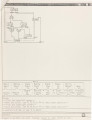
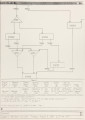
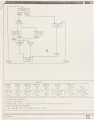
Show 6. Help files display the uses of menu items at each level where the user is working. 7. Reminding, warning or error messages are displayed in the standard output pane for references. 8. Scaling of the graphical state-machine is also equipped. 9. Windowing is used to set up a viewport for looking at the graphical state-machine. 10. Writing into a transcript a textual description of the state-machine so that a hard copy can be obtained. 11. Scrolling is used to move around in, and see different part of the graphical state-machine. 12. Filing capability, i.e., saving into or retrieving from an external file of a state-machine is equipped. 13. A functional simulator for checking design is incorporated into GCS. developed in the ASSASSIN system.) the behavior of the (This is the simulator 14. The application program CAPTURESCREEN [10] may be invoked from inside the menu items, thus is used to obtain hard copies of graphical state-machines. 1.4 Outline of the Following Chapters 5 Chapter 2 gives a brief description of the target computer, The Apollo Domain system and the interface to GCS. Also contained in this chapter is a control-unit example GCSTEST, which is also used later to explain most of the features provided by GCS. The functional simulator is also described using the same example. Chapter 3 discusses the advantage of implementing the system in PSL. The programming environment set up both by PSL and the Apollo Domain system are presented. Finally, Chapter 4 summarizes the results of this work and indicates directions for future work. Appendix A details the BNF description of several types of logical expressions used in GCS. Appendix B contains a detailed |