| OCR Text |
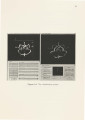
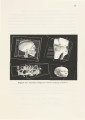
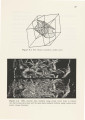
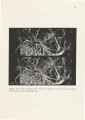
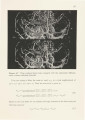
Show CHAPTER 4 MATTE VOLUMES GENERATOR In next few sections we will explore a number of techniques to generate matte volumes. All the techniques might not be applicable for every type of data, but they provide the user with a variety of choices to use according to the type of problem they are facing. 4.1 Cookie Cutter We have already discussed how the isosurface/slicer combination is useful in picking the seed point in the volume. The same tools can be used to define arbitrary geometric shape as the matte volume. The isosurface provides a good visual approximation to the actual image. The advantage of isosurface rendering is that it can be rotated in real time. The orthogonal data slice through the volume can be viewed immediately. This slice can be moved in and out of the volume, orthogonal to the view vector. We define the matte volume by first manipulating the slice so that it intersects the region of the data volume in which we are interested. Then we use the mouse like a knife to carve a curve outlining the region of interest. Without changing the orientation of the volume with respect to the view vector, the curve can be extruded to define the near and far clipping plane to get a matte volume. Thus we have a volume which seems to have been cut using a knife, shaped like the curve, and moved into the volume along the view vector from the near plane to the far plane. This operation is similar to cutting a shape using a cookie cutter. So this tool is called a Cookie Cutter. The Figure 4.1 illustrates a cookie cutter matte volume. The points on the cookie curve and the near and far clipping planes are transmitted to the volume |