| OCR Text |
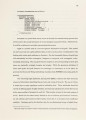
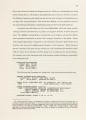
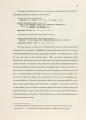
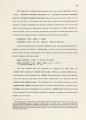
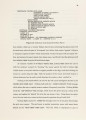
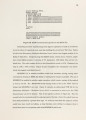
Show CHAPTER3 OF MICE AND MENUS The focus of this chapter is the interaction of mouse and menu with the other objects in INSTED's repertoire- particularly ports, which will also be explored. The goal of this chapter is to show that by taking advantage of the powerful functionality furnished by the Symbolics, this interaction is made easy and natural, enabling user commands to be executed with dispatch and aplomb. To comment a moment on "momentary" menus, mentioned in Chapter 1, one of their chief characteristics is the ability to display a list of "mouse sensitive" items, or options. Moving the mouse "arrow" to point at an option causes a box to be drawn around it; whereupon, if the user presses a button on the mouse, the item will be chosen, causing an associated value or operation to be returned or invoked. In similar fashion, a random Structured Tiling object can be treated as a mouse sensitive item, and can be manipulated thereby. Since the means by which this works plays such a large role in INSTED, the next section will examine it in detail. 3.1 Mouse Sensitivity To mimic the way menus make the mouse sensitive to their items requires provid-ing four basic mechanisms. To efficiently implement these mechanisms, INSTED makes them attributes of the grid window by means of the MOUSE-SENSITIVE-OBJECTS-MIXIN flavor, which requires the GRID-MIXIN to be a component flavor of the grid also. (DEFFLAVOR MOUSE-SENSITIVE-OBJECTS-MIXIN () (OBJECT-BLINKER MOUSE-MOVES-FUNCTION MOUSE-CLICK-FUNCTION MOUSE-DOCUMENTATION-STRING-FUNCTION) :SETTABLE-INSTANCE-VARIABLES (:REQUIRED-FLAVORS TV:SHEET GRID-MIXIN)) |